Google Ads experiments now auto-apply results by default
New Google Ads shortcut speeds rollout after a test wins, but only the metrics you picked get protected when changes move into campaigns.
Google Ads has recently introduced an auto-apply feature for experiments, which is now set to default. This new shortcut aims to speed up the rollout of successful changes in campaigns, but it comes with some important considerations for advertisers.
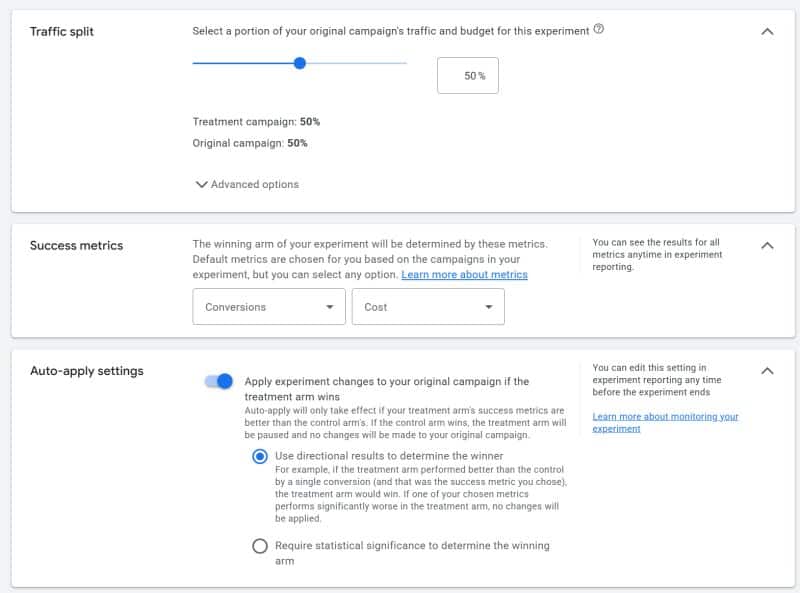
The auto-apply setting allows users to choose between directional results (default) or statistical significance at 80%, 85%, or 95% confidence levels. This means that when an experiment reaches the chosen threshold, the winning variants will automatically be applied to the campaigns without requiring manual approval. This can save time and streamline the process of implementing successful changes based on data-driven insights.
However, there is a safeguard in place to prevent unintended consequences. If the chosen success metric performs significantly worse in the test arm, the auto-apply feature will not be triggered, ensuring that only improvements are rolled out. This is an important feature, as it helps protect against potential harm caused by unexpected outcomes.
While the auto-apply feature can be beneficial for simple and straightforward experiments, it is crucial to remember that it only protects the metrics that users explicitly select. If there are other metrics that are important to the advertiser but were not chosen as success metrics, they may be overlooked if they decline. This means that advertisers should carefully consider which metrics are most critical to their campaigns and ensure they are included in the experiment.
Google Ads specialist Bob Meijer recently shared this update on LinkedIn, highlighting the potential benefits and drawbacks of the new feature. He emphasized that while auto-apply can be a useful shortcut for simple tests, more consequential changes should still undergo manual review. This involves running the experiment, reaching the desired significance level, and then thoroughly reviewing the full data before applying the changes to live campaigns.
In conclusion, Google Ads' auto-apply feature for experiments is a welcome addition that can help advertisers save time and efficiently implement successful changes. However, it is essential for users to remain vigilant and ensure that all critical metrics are considered. For important decisions, manual review remains a prudent approach to avoid overlooking any potential issues that might arise from the automated process.