Google Ads experiments now auto-apply results by default
New Google Ads shortcut speeds rollout after a test wins, but only the metrics you picked get protected when changes move into campaigns.
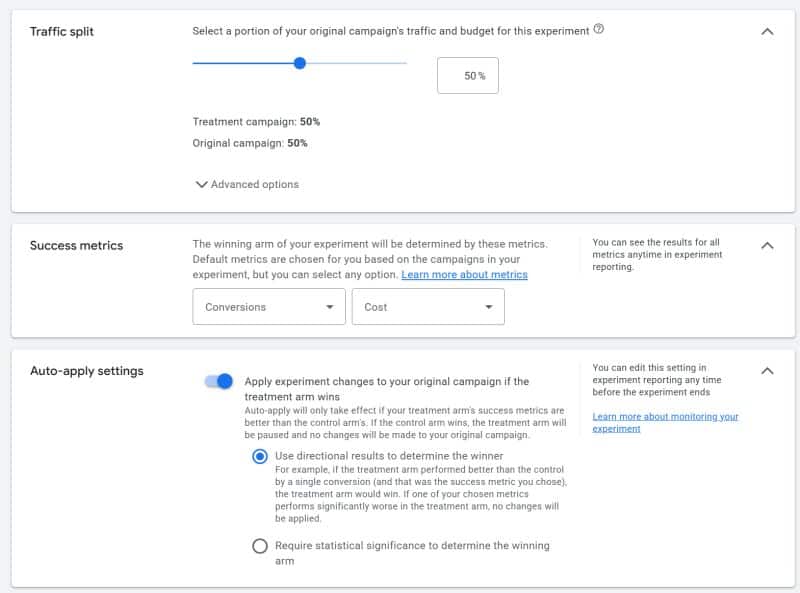
Google Ads has recently introduced an auto-apply feature for experiments, which is now set to default. This new shortcut aims to speed up the rollout of successful experiments, allowing winning variants to go live without requiring manual review. However, it's important to note that only the metrics users have selected are protected when changes are applied.
The auto-apply setting works by allowing advertisers to choose between directional results (default) or statistical significance at 80%, 85%, or 95% confidence levels. This means that users can decide how confident they need to be in the success of their experiment before it is automatically applied to their campaigns.
One safeguard built into the auto-apply feature is that it will not apply changes if the chosen success metric performs significantly worse in the test arm. This is designed to prevent unintended consequences from being rolled out to live campaigns.
Experiments are a crucial tool for advertisers using Google Ads, as they allow users to test different variations of their campaigns to see which ones perform best. By automating the application of successful experiments, advertisers can save time and quickly implement changes that have been proven to improve their campaign's performance. However, this automation also removes a critical checkpoint where advertisers can review the full data before applying changes.
A potential downside to the auto-apply feature is that it only allows advertisers to select two success metrics. This means that any third metric that the advertiser cares about—one that was not selected or could not be selected—may decline unnoticed if it's not monitored manually. The auto-apply feature is designed to protect what users have explicitly told Google to watch, not everything that matters.
In conclusion, the auto-apply feature in Google Ads experiments is a useful shortcut for simple tests, allowing advertisers to quickly implement successful changes. However, for more consequential experiments, it's still advisable to maintain manual review. Advertisers should run their experiments, reach the desired level of statistical significance, and then review the full data before applying any changes to their live campaigns.
This update was first shared by Google Ads specialist Bob Meijer on LinkedIn, highlighting the latest developments in the platform's experimentation tools.